Batch API: half-price inference by bundling requests
Brian Thomas ·
For large batches of work or requests that don’t need to be completed immediately, you can now use the new batch API. When submitting a batch, a provider gets to choose when during a 24 hour window they will complete the request, and in exchange they generally charge 50% (and sometimes less) of their normal per-token price.
It works today on more than 70 models. Learn how to use it in the Batch API docs.
In practice, we’ve observed you rarely wait anywhere near 24 hours. Across 230k+ batches that completed over our two week beta period, the median finished in 7 minutes and 90% finished within an hour.
Batch is an asynchronous API for workloads where you can accept highly variable response times, such as labeling a corpus, back-filling embeddings, scoring an eval set, summarizing a backlog of tickets, or running the same prompt across a few thousand rows overnight.
How the Batch API works
Call api/v1/batches with your list of requests and specify what endpoint shape to use. Chat completions, responses, messages, and embeddings are all supported. For example:
curl https://openrouter.ai/api/v1/batches \
  -H "Content-Type: application/json" \
  -H "Authorization: Bearer $OPENROUTER_API_KEY" \
  -d '{
  "endpoint": "/v1/chat/completions",
  "model": "google/gemini-3.8-flash",
  "requests": [
    { "custom_id": "ticket-0001", "body": { "messages": [{ "role": "user", "content": "Summarize this ticket in one sentence." }] } },
    { "custom_id": "ticket-0002", "body": { "messages": [{ "role": "user", "content": "Summarize this ticket in one sentence." }] } }
  ]
}'
After the request, begin polling GET /api/v1/batches/:id until the status is completed, failed, expired, or cancelled. Completed batches return their results inline in the same response.
Most batches finish in minutes
We looked at the batches that completed during our two week beta period and measured the time from acceptance to finished results. The median was 7 minutes, the 90th percentile was 1.0 hour, and the 99th percentile was 10.3 hours. We also found that the time of day you submit matters more than how many requests you send.
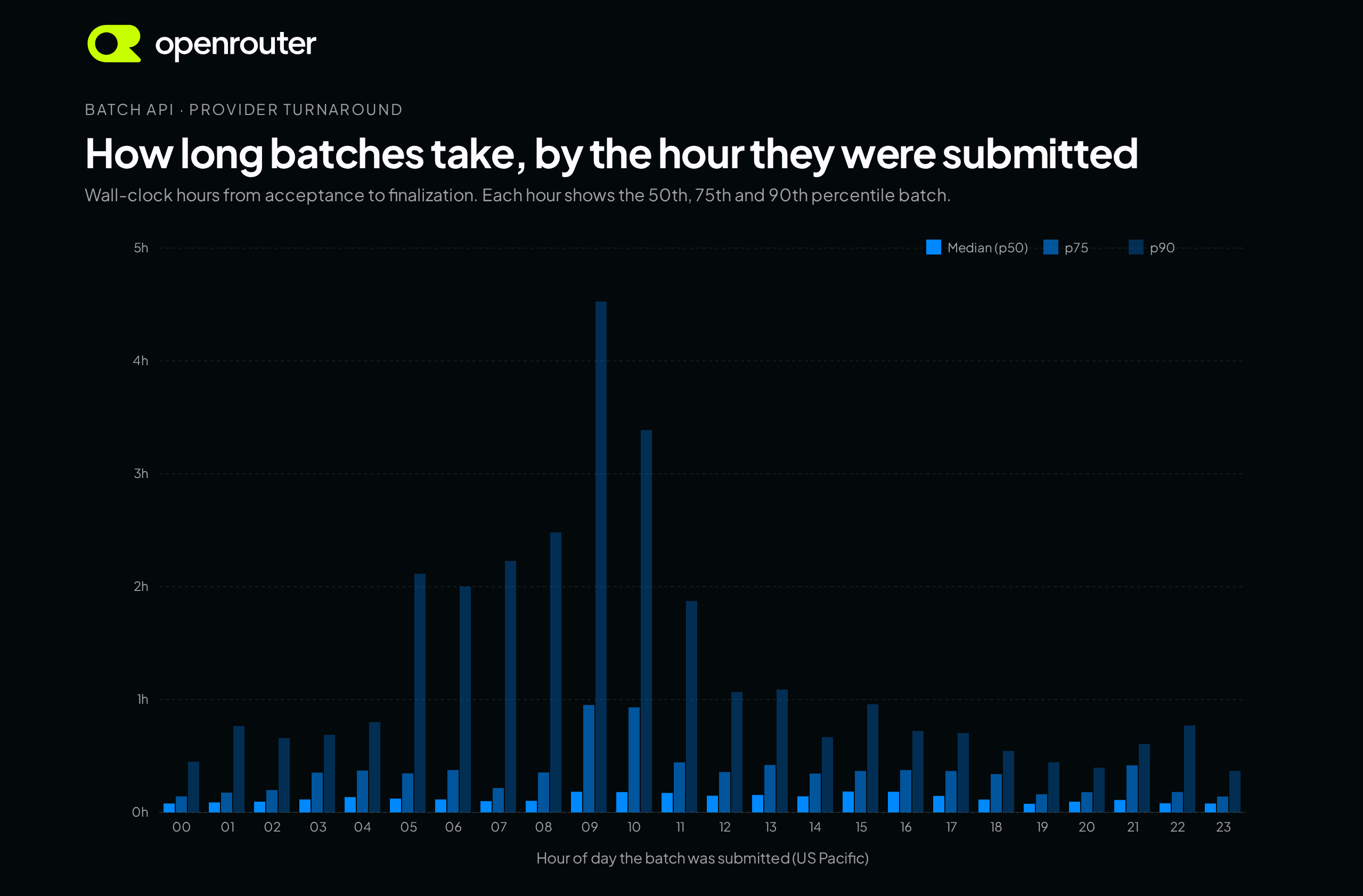
Batches submitted between 5am and noon Pacific are significantly slower than other times of day. The slowest tenth take 2 to 4.5 hours. Submit at any other hour and the 90th percentile drops under 1.1 hours, and after 6pm Pacific it’s under 50 minutes.
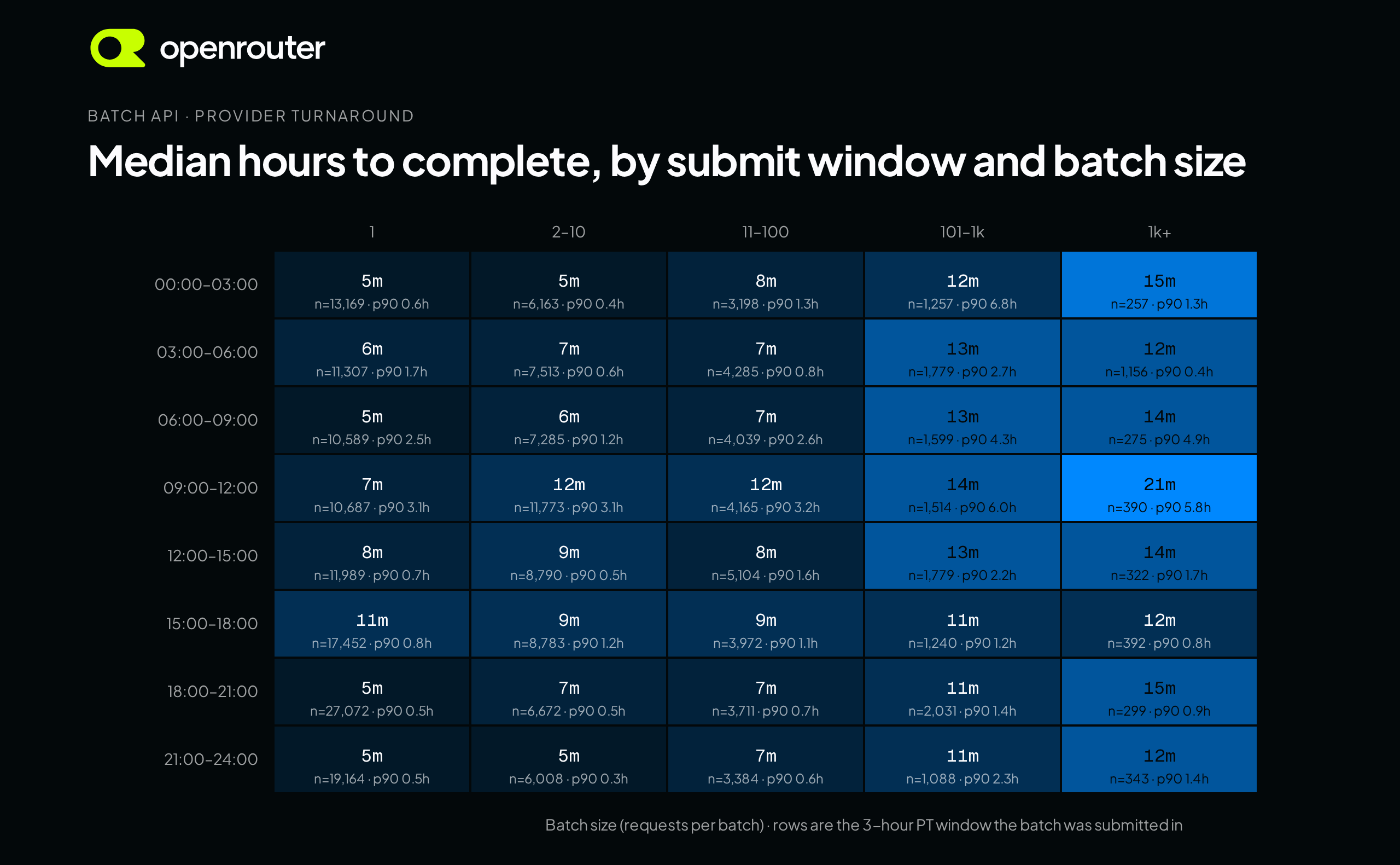
A single-request batch finishes in 5 to 11 minutes depending on the hour, and a batch of 1,000 or more requests finishes in 12 to 21 minutes. Large batches do take longer to process. The slowest tenth of batches with more than 100 requests submitted between midnight and noon Pacific took as long as 6.8 hours.
What’s supported with batches
- Request shapes: any text request body shape you already send to OpenRouter will be supported, including chat completions, responses, messages, and embeddings.
- Routing: Each batch is executed on a single provider. By default we choose the cheapest batch endpoint for the model after your provider allowlist, data policy, and BYOK settings are applied.
- BYOK: with a provider key configured, batches on providers that support it route through your key and you pay only the BYOK fee.
- Per-request results: every result returns independently, so a few bad rows never fail the rest of the job.
- Retention: inputs and results are kept for 30 days, or until you
DELETEthe batch. - Logging: every batch shows up in the Batches tab of your logs with model, provider, status, and cost.
- Pricing: the discount applies to per-token pricing and varies by model. Web search calls bill at standard rates.
- Inputs: images and files must be public URLs. Audio, video, and OpenRouter’s own web search plugin aren’t available in batch (see the limitations section of the docs).
Get started
Pick a batch-capable model, grab an API key, and post your first batch to https://openrouter.ai/api/v1/batches. The Quickstart has the full request and response shapes.
Tell us what you’re batching in #feedback on Discord.