The Cheapest Token Is a Cached One: Prompt Caching + Sticky Routing
OpenRouter · · Updated

Your agent sends the same system prompt, tool definitions, schemas, and policy instructions on every turn. In a 6-turn session, you can get billed for that same opening block 6 times, even though the only thing that changed is the user’s latest message or the agent’s latest tool result.
Prompt caching fixes that. The provider reads the repeated part of your prompt from cache instead of charging you full price for it every time. Sticky routing keeps that working across turns by sending a session back to the same provider that holds the warm cache.
This post covers the money side: what cached tokens cost, why cache reads and writes are priced differently, how session_id keeps an agent’s session warm from turn one, and how to check that caching is actually working.
Tl;dr
- A cache read costs 0.1x to 0.5x of a fresh input token, depending on the provider. On Claude Sonnet 4.6, a cache read runs at $0.30/M against $3.00/M input, exactly 0.1x.
- The first request pays a cache write. Anthropic writes cost 1.25x (5-minute TTL) or 2.0x (1-hour TTL) of input, so a single unreused write costs more than not caching at all.
- A warm cache only helps if your next request lands on the same provider endpoint. Across 70+ providers, turn two can hit a cold endpoint, and you pay full price.
- Our sticky routing pins follow-up requests to the provider holding the warm cache, and
session_idforces that from the first successful request, before any cache hit has happened. - Cache misses come from 4 causes: a prompt that’s too short, an expired cache, an opening block that keeps changing, or a request that moved to a different provider. Check
cached_tokensin the usage response to confirm a hit.
How much does prompt caching cut your token cost?
A cache read costs 0.1x to 0.5x of normal input pricing, depending on the provider. That range is why caching can make agent loops much cheaper.
The repeated part is usually the expensive part: a long system prompt, tool definitions, JSON schemas, guardrails, retrieved documents, or examples that keep the model consistent. Without caching, each turn pays full price for all of it again. With caching, the first request writes it to the cache, and later requests read it back at the cheaper rate.
Here’s the provider-level view:
| Provider | Cache read | Cache write | How to enable |
|---|---|---|---|
| Anthropic Claude (5-min TTL) | 0.1x input | 1.25x input | Automatic or explicit |
| Anthropic Claude (1-hour TTL) | 0.1x input | 2.0x input | Explicit (ttl: "1h") |
| OpenAI (before GPT-5.6) | 0.25x-0.50x input | Free | Automatic |
| OpenAI (GPT-5.6 and later) | 0.25x-0.50x input | 1.25x input | Automatic or explicit |
| Google Gemini (implicit) | 0.25x input | Free | Automatic |
| Grok (xAI) | 0.25x input | Free | Automatic |
| Moonshot AI | 0.25x input | Free | Automatic |
| Groq | 0.5x input | Free | Automatic (Kimi K2 models) |
| DeepSeek | 0.1x input | 1.0x input | Automatic |
| Alibaba Qwen | 0.1x input | 1.25x input | Explicit (cache_control) |
| Z.AI | ~0.2x input | Free | Automatic |
The prompt caching docs have the full breakdown. The exact dollar amount still depends on the model and provider route; the multiplier tells you how cached input compares with normal input for that provider.
For agent builders, the pattern is simple: the first turn may pay to set up the cache, but every turn after that gets much cheaper as long as the same opening block is reused.
Where does the cost go: cache writes versus cache reads?
Prompt caching has two costs: the write and the read.
The write happens when the provider stores the reusable part of the prompt. The read happens when a later request reuses that stored content. You come out ahead once the same content gets read enough times to cover the write.
On some providers, the write costs more than normal input. Anthropic cache writes cost 1.25x input for the default 5-minute TTL and 2.0x input for the 1-hour TTL. A single Anthropic cache write that’s never reused costs more than sending the same prompt without caching.
For a one-off request, caching may not help. For a multi-turn agent, repetition is the default: the agent carries the same instructions, tools, schemas, and policy context across the whole session. So the write pays for itself over a few turns.
Use the 5-minute cache lifetime (TTL) for short bursts where the next turn arrives quickly. Use the 1-hour one when a session may pause long enough for the default cache to expire, but the content is still worth keeping around.
Why doesn’t a warm cache always help on the next request?
A warm cache only helps if the next request lands on the provider endpoint that holds it.
When requests can route to many providers, turn one can write a cache on one provider while turn two lands somewhere else. The second provider has no warm cache to read from. The request still works, but you pay full price and cached_tokens stays low or zero.
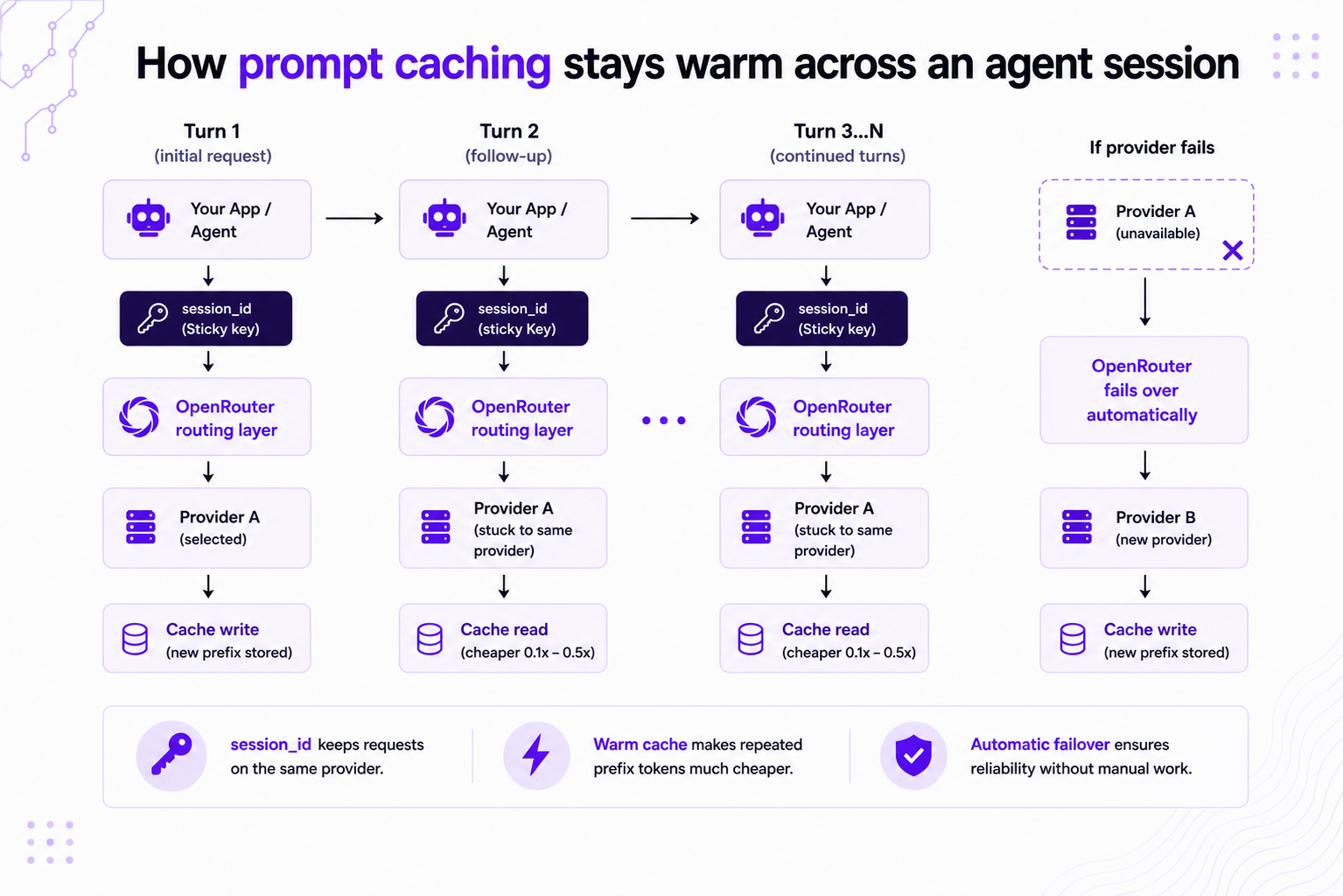
That’s why we pair sticky routing with prompt caching. After a cached request, we route follow-up requests for the same model back to the same provider endpoint when that provider’s cache-read pricing is cheaper than normal input. If that sticky provider becomes unavailable, OpenRouter falls back to the next available provider instead of failing the request.
By default, OpenRouter recognizes a conversation by hashing its first system or developer message and its first non-system message. That works when those opening messages stay the same.
Agents often break that. Some rewrite their first messages as they summarize state, reorder tool context, or add new run metadata. When the opening messages change, the hash changes, and the conversation can land on a different provider. The fix is an explicit session_id.
Force a warm cache from turn one with session_id
For agent loops, set session_id. When you pass it, OpenRouter uses it directly as the sticky routing key instead of deriving a key from the opening messages.
With session_id, sticky routing kicks in after the first successful request, before any cache hit has happened. Without it, stickiness only starts after a cache hit is detected. For multi-turn agents, that’s the difference between a cache that’s reliable from turn one and one that’s only sometimes warm.
You can send session_id as a top-level request body field or through the x-session-id header. Keep it stable for the conversation or agent run, and keep it under 256 characters.
curl https://openrouter.ai/api/v1/chat/completions \
  -H "Authorization: Bearer $OPENROUTER_API_KEY" \
  -H "Content-Type: application/json" \
  -d '{
    "model": "anthropic/claude-sonnet-4.6",
    "session_id": "my-agent-session-abc123",
    "messages": [{"role": "system", "content": "..."}]
  }'
from openrouter import OpenRouter
client = OpenRouter()
resp = client.chat.send(
model="anthropic/claude-sonnet-4.6",
session_id="my-agent-session-abc123",
messages=[{"role": "system", "content": "..."}],
)import { OpenRouter } from '@openrouter/sdk';
const openRouter = new OpenRouter({ apiKey: process.env.OPENROUTER_API_KEY });
const response = await openRouter.chat.send({
model: 'anthropic/claude-sonnet-4.6',
session_id: 'my-agent-session-abc123',
messages: [{ role: 'system', content: '...' }],
});Use a value that matches the unit of work: a chat thread, ticket, workflow run, or agent task. Don’t create a new session_id for every turn, or requests stop landing on the provider that holds the cache.
If you use router models such as Auto Router or Pareto Router, session stickiness also reuses the model the router picked, not just the provider, on a best-effort basis: the remembered model is preferred on later turns while it remains among the router’s current candidates, so the router may still select a different model when the task or your settings shift.
How do I confirm prompt caching is even working?
The fastest way to check is to inspect usage.
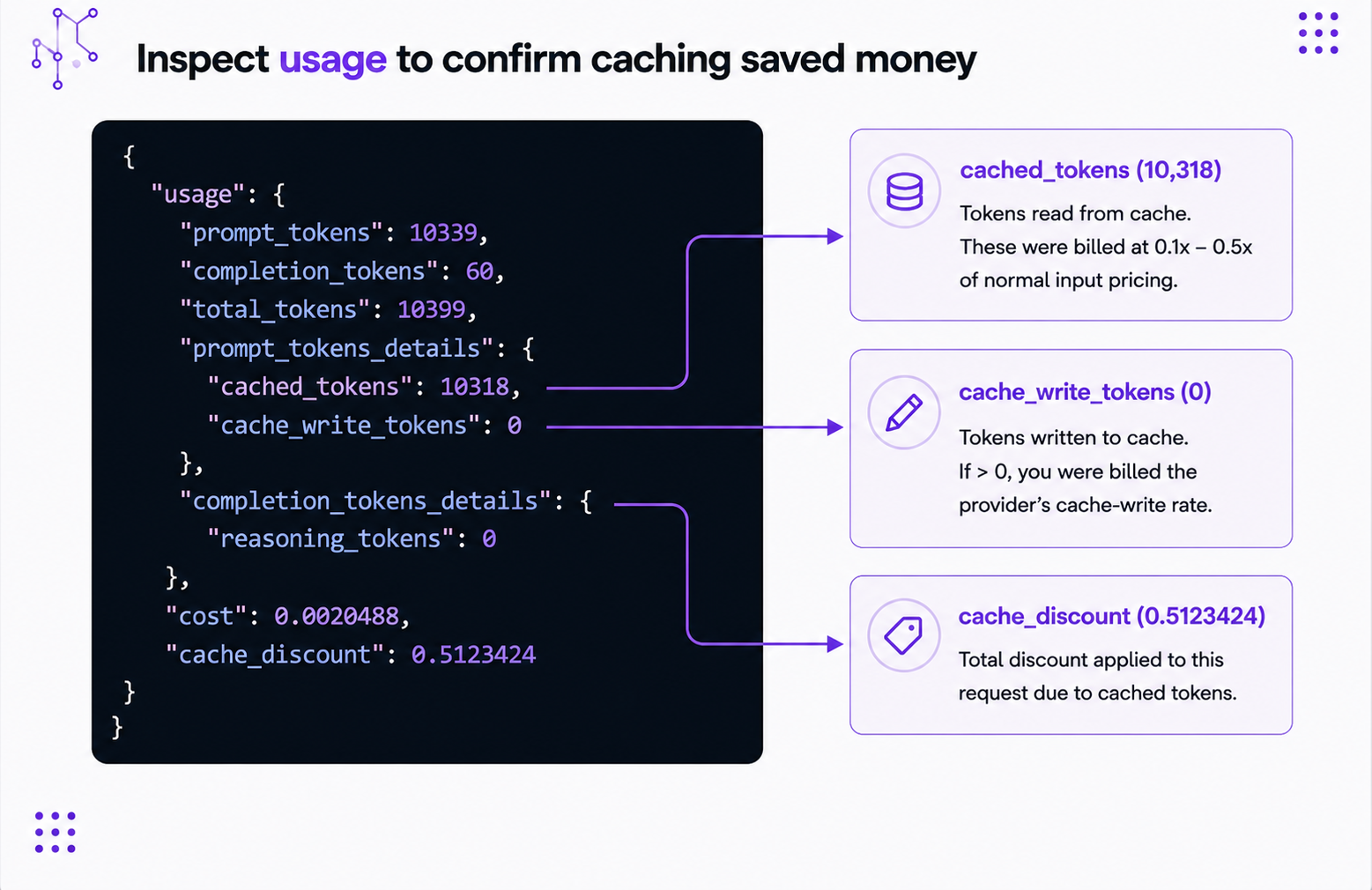
In the response, usage.prompt_tokens_details.cached_tokens shows how many tokens were read from cache. If it’s greater than zero, the request hit the cache. cache_write_tokens shows how many tokens were written during a cache-write request.
{
  "usage": {
    "prompt_tokens": 10339,
    "completion_tokens": 60,
    "total_tokens": 10399,
    "prompt_tokens_details": {
      "cached_tokens": 10318,
      "cache_write_tokens": 0
    }
  }
}
In this example, most of the prompt tokens came from cache, and this turn didn’t write a new cache entry.
You can inspect cache behavior in three places: the detail view on the Activity page, the /api/v1/generation API, and the usage.prompt_tokens_details object returned with API responses.
Use cache_discount to see what a generation saved. On providers with paid writes, you may see a negative discount on the write turn because the cache write costs more than normal input. On later cache-read turns, the discount should turn positive.
Why does your cache miss, and how do you stop it?
When caching looks broken, it usually comes down to one of 4 things: the prompt is too short, the cache expired, the opening content changed, or the request moved to a different provider.
The prompt is below the provider’s minimum
Every provider has a minimum prompt size, and below it nothing gets cached. On Anthropic, Claude Opus 4.5 through 4.8 and Claude Haiku 4.5 need 4,096 tokens; Claude Haiku 3.5 needs 2,048; Claude Sonnet 4, 4.5, and 4.6 (and Opus 4 / 4.1) need 1,024. OpenAI needs 1,024. Gemini 2.5 Pro needs 4,096; Gemini 2.5 Flash needs 1,024.
If your reusable content sits below that minimum, caching won’t start. Don’t pad the request with filler text just to force it. Use caching where you already have a lot of reusable content: tools, schemas, retrieved documents, examples, or policy text.
The cache expired between turns
Caches don’t live long. Anthropic’s default is 5 minutes, with a 1-hour option for longer sessions. Gemini’s implicit cache lasts about 3-5 minutes and doesn’t reset when you read from it. Once a cache expires, the next request has to write a new one.
If your users often pause between turns, use a longer TTL where supported, or build the agent to accept a new write after idle periods.
The start of the prompt keeps changing
Automatic and implicit caching work best when the start of the prompt stays the same. Put the stable stuff first: system instructions, tools, schemas, and fixed reference material. Put the changing stuff later: user questions, timestamps, temporary state, tool outputs, and short-lived metadata.
Small details count here. A timestamp in the first system message makes the prompt look new on every turn. Move it into a later user or tool message if it doesn’t need to be part of the cached content.
The request drifted to a different provider
A cache lives where it was written. If a later request routes to a different provider endpoint, that endpoint can’t read the earlier cache.
For agent workflows, set session_id and let sticky routing keep the session on the warm provider. One catch: if you set provider.order yourself, your order wins over sticky routing. Use provider routing controls if you need a specific provider order.
Putting caching and sticky routing together for an agent loop
If your agent sends the same content every turn, here’s the checklist:
- Put stable content first: system prompt, tool definitions, schemas, policies, and long-lived context.
- Put changing content later: user messages, tool results, timestamps, and run-specific state.
- Enable prompt caching for providers that need explicit
cache_control. - Set a stable
session_idfor the conversation or workflow run. - Inspect
cached_tokensandcache_discountto confirm that reads are happening.
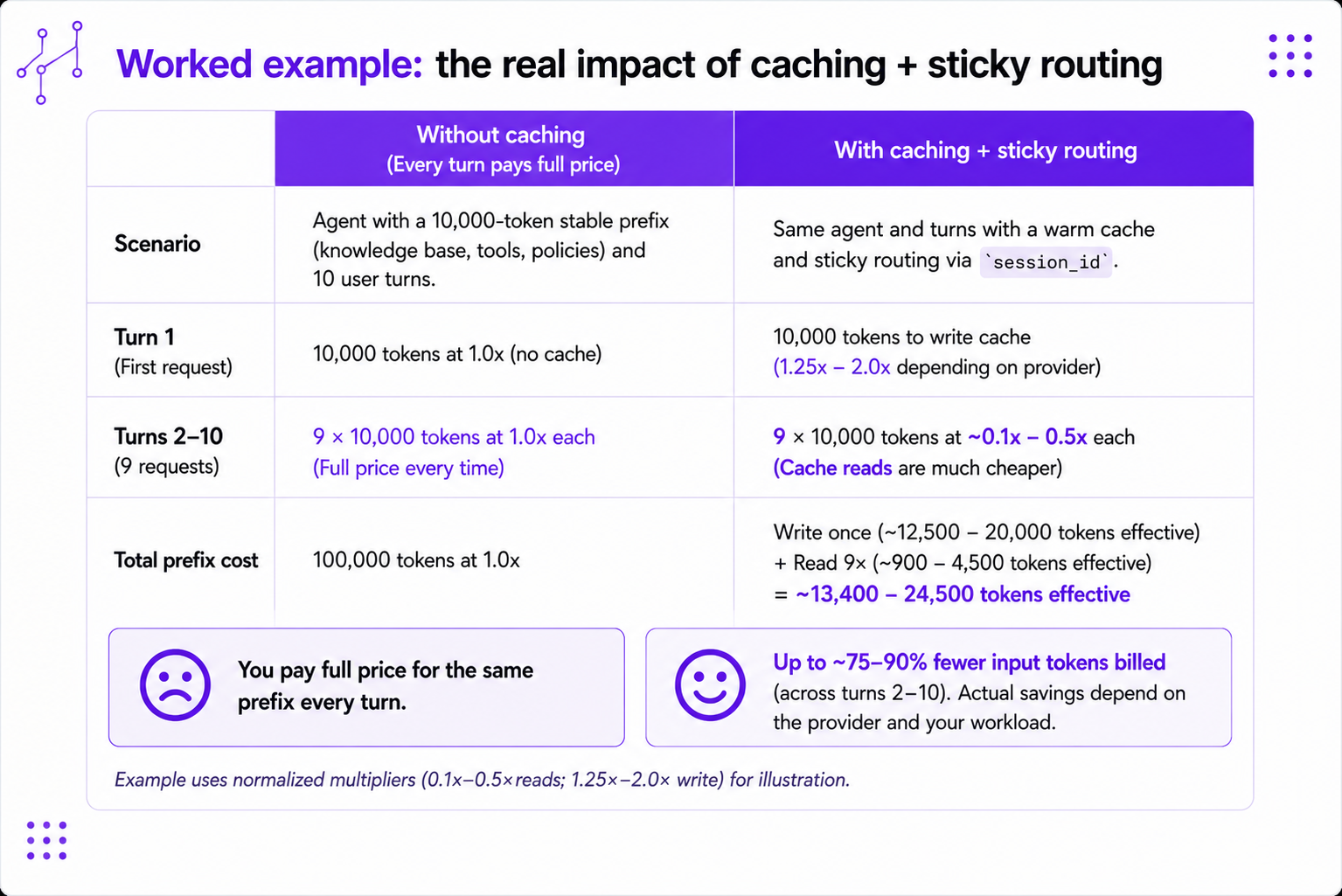
For a rough picture, imagine an agent that repeats the same 10,000 tokens over 6 turns.
| Scenario | Turn 1 | Turns 2-6 | Total cost (vs. 1 uncached turn) |
|---|---|---|---|
| No caching | Full input | Full input each turn | 6.0x |
| Anthropic 5-minute cache + sticky routing | 1.25x write | 0.1x reads | 1.75x |
| Free-write provider + 0.25x reads | 1.0x input/write | 0.25x reads | 2.25x |
| Free-write provider + 0.5x reads | 1.0x input/write | 0.5x reads | 3.5x |
This example covers only the repeated content. It ignores the smaller changing messages and the model’s output tokens. The savings grow with the number of turns.
When to use what:
- Use automatic caching for multi-turn conversations where the reused content grows with the conversation.
- Use explicit cache breakpoints when you know exactly which large blocks should be cached: retrieved documents, long reference files, character cards, CSV data, or policy text.
- Use
session_idfor agent sessions, support tickets, chat threads, workflow runs, and any conversation where the opening messages may change between turns. - Use the 1-hour cache for longer Anthropic sessions where the default 5-minute one may expire between turns. Use the default for short, dense back-and-forths.
When your agent sends the same expensive content again and again, cached reads and sticky routing keep it from becoming the most expensive part of the loop. Caching lowers the price of the tokens you send. For the routing settings that lower the price per token in the first place, see how to get the lowest-cost LLM inference on OpenRouter.
FAQ
Does OpenRouter support prompt caching?
Yes. OpenRouter supports prompt caching across supported providers and models. Most providers enable it automatically, while Anthropic and Alibaba Qwen use cache_control for explicit caching. Cache reads cost 0.1x to 0.5x of normal input pricing depending on the provider, so a reused prefix gets much cheaper after the first request.
How much do cached tokens cost on OpenRouter?
Cache reads cost 0.1x to 0.5x of normal input pricing, depending on the provider. Anthropic, DeepSeek, and Alibaba Qwen can read at 0.1x. OpenAI reads at 0.25x to 0.50x. Gemini, Grok, and Moonshot read at 0.25x. Groq reads at 0.5x.
Why is prompt caching not working through OpenRouter?
The common causes are a prompt below the provider’s token minimum, an expired cache, an unstable prompt prefix, or provider drift between turns. For agent workflows, start by setting a stable session_id, then check cached_tokens in the usage response, where any value above zero confirms a cache hit.
How do I keep a cache warm across an agent’s turns?
Pass a stable session_id for the conversation, ticket, or workflow run. OpenRouter uses it as the sticky routing key, so follow-up requests route back to the same provider endpoint that holds the warm cache. With session_id set, stickiness activates after the first successful request, before any cache hit is observed.
How do I check whether caching saved money?
Inspect usage.prompt_tokens_details.cached_tokens for cache reads and cache_write_tokens for cache writes; a cached_tokens value above zero confirms a hit. You can also read cache_discount in the response to see the per-generation cost effect, or open the detail view on the Activity page or the /api/v1/generation API.
Does caching work with the Auto Router?
Yes. With a session_id set, router models such as Auto Router and Pareto Router pin both the resolved model and the provider for the conversation, so follow-up turns keep hitting the same warm cache.